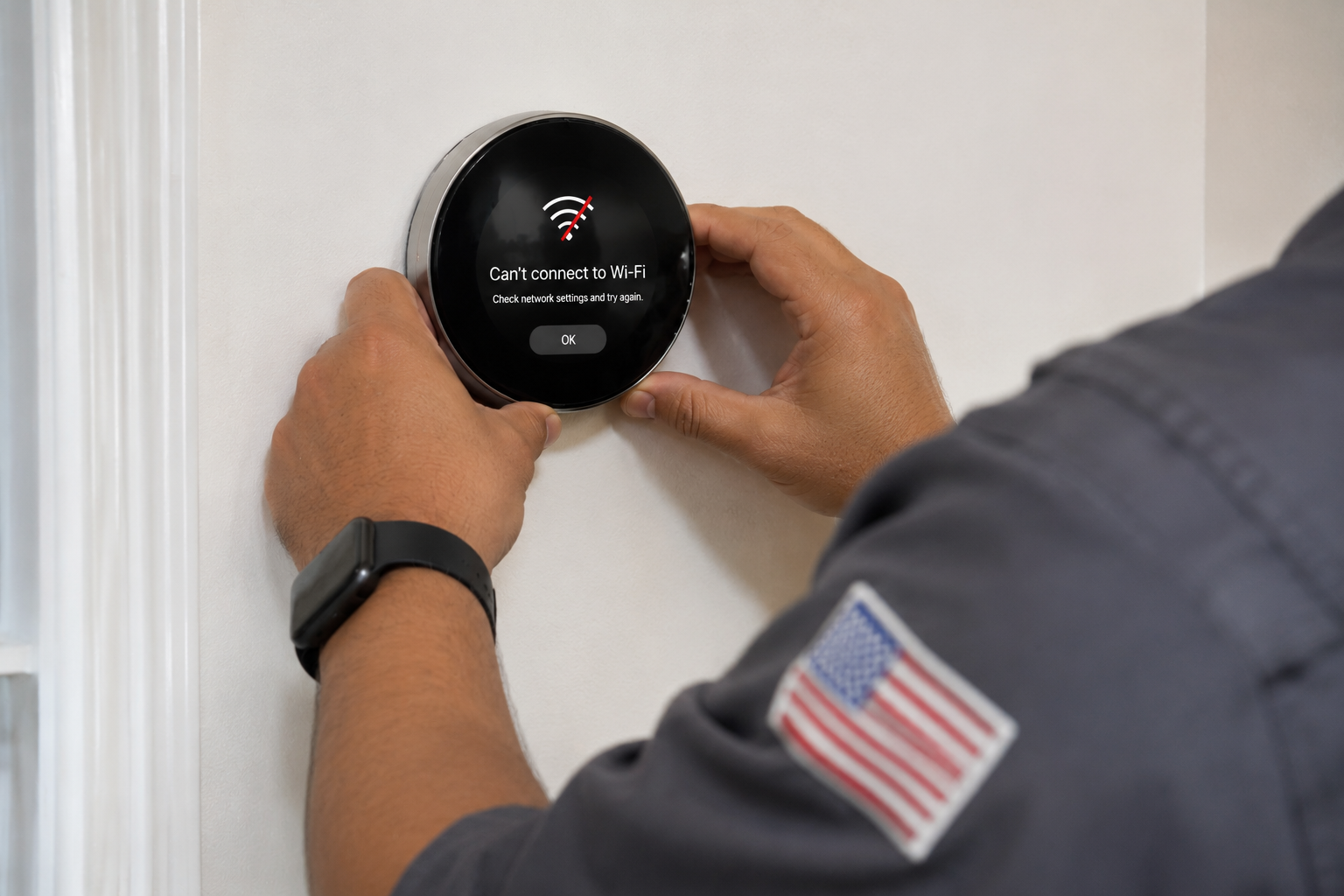

A smart thermostat can make it easier to manage your home’s heating and cooling, but losing its Wi-Fi connection can interrupt app access, remote temperature adjustments, and certain connected features. If your thermostat suddenly shows an offline message or refuses to connect to your home network, the cause may be a router problem, weak wireless signal, incorrect network credentials, or a thermostat setting that needs attention.
A lost Wi-Fi connection does not necessarily mean your heating and cooling system has stopped working. Depending on the thermostat model and the condition of the equipment, you may still be able to adjust the temperature directly at the wall-mounted thermostat even when remote access is unavailable.
Before replacing the thermostat or changing your HVAC wiring, it is worth checking the network connection and the manufacturer’s troubleshooting instructions. If the display is blank, the thermostat cannot control the system properly, or the problem continues after basic network checks, the issue may require further investigation.
Does a Smart Thermostat Need Wi-Fi to Control My HVAC System?
Not necessarily. Many smart thermostats can continue controlling a compatible heating or cooling system locally when their internet connection is unavailable. However, the exact behavior depends on the thermostat model, its configuration, and the equipment it controls.
When Wi-Fi disconnects, remote access through a smartphone app may stop working. Features that depend on an internet connection, such as remote adjustments or certain online services, may also become unavailable. Some models may continue following their programmed schedules, while others may have different limitations.
Try adjusting the temperature directly on the thermostat to see whether the display responds and the HVAC system operates. If the equipment responds to local adjustments, the problem may be limited to network connectivity rather than the heating or cooling system itself.
If the thermostat has a blank screen, does not respond to input, or cannot operate the equipment, do not assume Wi-Fi is the only issue. The device may have a power problem, a wiring issue, or another fault that needs attention.
Why Is My Smart Thermostat Not Connecting to Wi-Fi in Fairfax, VA?
Several different problems can prevent a smart thermostat from connecting to a home network. The router may be offline, the thermostat may have lost its saved network credentials, or the wireless signal may be too weak at the thermostat’s location.
Network changes are another common source of trouble. If you recently replaced your router, changed your Wi-Fi password, renamed your network, or adjusted security settings, the thermostat may no longer be able to connect using its previous configuration.
The thermostat itself may also need to reconnect to the network or restart after a temporary software or communication problem. However, the correct procedure varies by manufacturer and model.
Start by checking whether other devices can access the internet, then verify the network information stored in the thermostat. If those checks do not resolve the issue, consult the manufacturer’s instructions before performing a reset that could erase saved settings.
Could My Wi-Fi Router Be Causing the Connection Problem?
Yes. A smart thermostat depends on a compatible, functioning wireless network to provide connected features. If the router loses its internet connection, stops broadcasting the network, or experiences a temporary fault, the thermostat may appear offline.
Check whether your phone or another device can connect to the same Wi-Fi network and access the internet. If multiple devices are having trouble, the issue may involve the router, modem, internet service, or home network rather than the thermostat.
If other devices work normally, the problem may be more specific to the thermostat’s connection. You can check whether the correct network name is selected and whether the password is current.
Restarting the router may resolve a temporary networking problem. Follow the router manufacturer’s instructions and allow the network to come back online before attempting to reconnect the thermostat.
If the thermostat still cannot connect while other devices work, check the manufacturer’s recommended network settings and troubleshooting steps rather than repeatedly restarting all your equipment.
Is My Smart Thermostat Too Far From the Router?
A weak wireless signal can make it difficult for a smart thermostat to maintain a reliable connection. The signal may be reduced by distance, walls, floors, furniture, and other obstacles between the thermostat and the router.
This can become noticeable when a router is moved, new obstructions are introduced, or a previously reliable connection begins dropping out. The thermostat may connect intermittently or fail during the setup process.
You can compare the Wi-Fi signal near the thermostat with the signal in another part of the house using a phone or other wireless device. This will not perfectly reproduce the thermostat’s wireless performance, but it may help identify a general coverage problem.
If the signal appears weak, consider repositioning the router where practical or improving wireless coverage using equipment compatible with your home network. Avoid moving HVAC equipment or altering thermostat wiring simply to improve Wi-Fi reception.
If the signal is strong but the thermostat remains offline, investigate network compatibility, credentials, and the thermostat’s own connection settings.
Could a Recent Wi-Fi Password or Router Change Disconnect My Thermostat?
Yes. A thermostat that was previously connected may lose access when you change the network name or password, replace the router, or modify the network configuration.
The thermostat may continue trying to connect using the old information. In that case, you may need to select the new network and enter the updated password through the thermostat’s menu or the manufacturer’s app.
Check the thermostat manufacturer’s instructions for reconnecting after a router replacement or password change. Some models reconnect automatically if the new network uses the same name and password as the previous one, but this behavior is not universal.
Be careful when changing network settings solely to accommodate the thermostat. Wireless frequency bands, security protocols, and other compatibility requirements vary by model. Some devices require a 2.4 GHz network, while others support additional configurations.
If you are unsure which settings your thermostat supports, verify them in the official product documentation before changing your router configuration.
Does My Smart Thermostat Support My Wi-Fi Network?
Not every smart thermostat supports every wireless configuration. Compatibility can depend on the model’s supported frequency bands, network security settings, and other technical requirements.
For example, some thermostats require a 2.4 GHz wireless network, while others support different options. A thermostat may fail to connect if the router is using a configuration that the device does not support.
Check the manufacturer’s specifications for your exact thermostat model. Do not assume that all smart thermostats have identical Wi-Fi requirements just because they provide similar app-based features.
If your router combines multiple wireless bands under one network name, consult the thermostat’s instructions to determine whether that arrangement is supported. Some devices connect successfully to combined networks, while others require a different configuration.
If the network meets the thermostat’s requirements and the device still cannot connect, the problem may involve signal strength, saved credentials, router settings, or a fault with the thermostat.
Why Does My Thermostat Keep Disconnecting From Wi-Fi?
A thermostat that connects successfully but repeatedly goes offline may be experiencing an unstable network connection rather than a problem with the initial setup.
Possible causes include weak wireless coverage, intermittent router or internet service, network configuration changes, or a device-specific issue. If the connection drops at predictable times, compare those periods with other network interruptions in the home.
Check whether other devices also lose connectivity when the thermostat goes offline. If they do, the router or internet service may be involved. If the thermostat is the only device affected, investigate its signal strength, supported network settings, and manufacturer-specific troubleshooting options.
Repeatedly reconnecting the thermostat without identifying the reason may provide only temporary relief. If the problem persists, document when the disconnections occur and whether the thermostat remains able to control the HVAC equipment locally.
That information can help narrow down the cause without assuming the thermostat itself needs replacement.
Can a Power Problem Make My Smart Thermostat Go Offline?
Yes. Some thermostat connection problems are associated with the device losing power or restarting unexpectedly. Depending on the model and installation, the thermostat may receive power through the HVAC system’s wiring or use another manufacturer-supported arrangement.
If the display goes blank, repeatedly restarts, or loses settings, the problem may extend beyond Wi-Fi connectivity. Possible causes can include a power interruption, an issue with the HVAC system’s control circuit, or a thermostat fault.
Check whether the thermostat display is illuminated and responsive. If the screen is blank, consult the thermostat manufacturer’s troubleshooting instructions rather than assuming that reconnecting to Wi-Fi will fix the problem.
Do not remove the thermostat from its mounting plate, handle exposed wiring, or change electrical connections unless the manufacturer’s instructions specifically permit the task and you are qualified to perform it. Some models use wiring arrangements that require professional diagnosis.
If the display remains blank or the thermostat repeatedly loses power, a qualified HVAC technician can inspect the relevant control circuit and equipment.
What If My Smart Thermostat Connects to Wi-Fi but the App Says It Is Offline?
A thermostat can sometimes connect to the local wireless network while the associated app or online service still reports it as offline. The thermostat’s connection to the router, its access to the internet, and its communication with the manufacturer’s service are related but distinct functions.
Check whether the thermostat itself displays a Wi-Fi connection and whether the app shows an error message. Then confirm that your phone has internet access and that you are using the correct account and the manufacturer’s current app.
A temporary service interruption, outdated app, account issue, or communication problem may prevent the app from displaying the thermostat’s current status. The exact explanation depends on the thermostat platform.
Follow the manufacturer’s instructions for refreshing the connection or checking the device’s online status. Avoid deleting the thermostat from your account or performing a factory reset unless the recommended troubleshooting steps call for it, since these actions may require you to set up the device again.
If the thermostat connects locally but cannot communicate with its app, the issue may be unrelated to your furnace or air conditioner.
Should I Reset My Smart Thermostat to Fix Wi-Fi?
A restart or reconnection attempt may help resolve a temporary problem, but a factory reset should not be the first step in every situation.
Start with the less disruptive checks: confirm that the router is online, verify the network name and password, and use the thermostat’s settings to reconnect to Wi-Fi if the manufacturer recommends doing so. You can also restart the thermostat if its instructions provide a safe, model-specific procedure.
A factory reset may erase network information, schedules, preferences, and other configuration settings. You may then need to complete the initial setup again and restore your preferred settings.
Before resetting anything, consult the official support instructions for your exact model. If the thermostat is hardwired and the recommended restart procedure involves switching off power, follow the manufacturer’s directions and do not work on exposed electrical wiring.
If repeated connection attempts fail, further troubleshooting may be more useful than resetting the device multiple times.
What Can I Check Before Calling for HVAC Service?
Begin with the network. Confirm that your internet connection is working, check whether other devices can connect to Wi-Fi, and verify that the thermostat is trying to connect to the correct network.
Next, review recent changes. Consider whether you replaced the router, updated the password, renamed the network, or changed wireless security settings. If you did, follow the manufacturer’s instructions to reconnect the thermostat using the current network information.
Check whether the thermostat’s display is operating normally and whether you can adjust the temperature directly at the device. If local controls work, you may be dealing with a connectivity problem rather than a complete loss of HVAC control.
Do not open the thermostat, alter wiring, or attempt to repair the furnace or air handler as part of routine Wi-Fi troubleshooting. If the display is blank, the HVAC system does not respond, or the device repeatedly loses power, arrange professional assistance.
These checks can help distinguish a network issue from a possible thermostat or HVAC control problem.
Can a Wi-Fi Problem Prevent My Heating or Cooling From Working?
It depends on the thermostat and the equipment configuration. Many smart thermostats retain local temperature-control functions when their internet connection is unavailable, so losing Wi-Fi may affect remote access without stopping normal heating or cooling.
However, the behavior varies by model, and an offline message does not guarantee that the rest of the system is operating correctly. A thermostat with a blank display, a power problem, or a control fault may be unable to manage the HVAC equipment as expected.
If the thermostat responds to local temperature adjustments and the system starts normally, you may be able to use those controls while you troubleshoot the network connection. Check the manufacturer’s instructions for any limitations that apply to your device.
If the equipment does not respond, the indoor temperature becomes uncomfortable, or the thermostat appears to have lost power, the issue may require HVAC service. A technician can determine whether the problem is limited to the thermostat or involves the system’s controls or wiring.
When Should I Call an HVAC Technician for a Smart Thermostat Problem?
If the thermostat remains powered and controls the HVAC system locally but cannot connect to Wi-Fi, start with the manufacturer’s network troubleshooting guidance. Your internet provider or router manufacturer may also be able to help if the problem appears to involve the home network.
Professional HVAC service becomes more relevant when the thermostat has a blank display, repeatedly loses power, fails to control heating or cooling, or shows symptoms that suggest a wiring or equipment-control problem.
A technician can inspect compatible thermostat wiring, check the HVAC system’s control circuit, and determine whether the device or another component is preventing normal operation. The technician may also be able to help establish whether the problem is related to the thermostat installation rather than the network itself.
If the only issue is communication between the thermostat and the manufacturer’s online service, the thermostat manufacturer may be the more appropriate source of assistance. Identifying which part of the connection has failed helps avoid unnecessary HVAC repairs.
Can a Smart Thermostat Be Repaired or Replaced?
The appropriate solution depends on the cause of the problem. A connection issue may be resolved by restoring internet service, correcting network settings, improving wireless coverage, or reconnecting the thermostat according to the manufacturer’s instructions.
If the thermostat has a power or control issue, the solution may involve correcting an installation problem, repairing an HVAC control circuit, or replacing a faulty component. In some cases, a defective thermostat may need replacement, but a Wi-Fi failure alone does not establish that the device has failed.
Before buying a new thermostat, verify that the current device is receiving power, the network meets its requirements, and the recommended troubleshooting steps have been completed. If a replacement is necessary, compatibility with the existing heating and cooling system should be confirmed before installation.
A proper diagnosis can help determine whether the issue belongs to the home network, the thermostat, or the HVAC equipment.
Looking for HVAC Service in Fairfax, VA?
If your smart thermostat will not connect to Wi-Fi, start by checking your internet connection, router, saved network credentials, and the manufacturer’s troubleshooting instructions. Many connectivity issues can be investigated without opening the thermostat or changing the HVAC system’s wiring.
Winds of Valley Heating & Cooling provides professional heating and HVAC services in Fairfax, VA, and surrounding Northern Virginia communities. If your thermostat has a blank screen, loses power, or cannot control your heating and cooling equipment, a technician can inspect the relevant HVAC components and help identify the cause.
Schedule HVAC Service in Fairfax, VA
A smart thermostat that appears offline does not necessarily need to be replaced. The problem may be related to the router, Wi-Fi signal, network compatibility, or the thermostat’s saved settings. However, a blank display or failure to operate the HVAC system may indicate a separate power or control issue.
Winds of Valley Heating & Cooling provides heating services and HVAC repair in Fairfax and nearby Northern Virginia communities. If your smart thermostat is experiencing a problem that affects heating or cooling operation, contact Winds of Valley to request service.
Frequently Asked Questions About Smart Thermostat Wi-Fi Problems
Will my thermostat still work if the internet goes out?
Many smart thermostats can continue controlling a compatible HVAC system locally when internet access is unavailable. However, available functions depend on the model and configuration, and app-based remote control may not work until the connection is restored.
Why did my thermostat stop connecting after I changed my router?
The thermostat may still be using the previous network name or password, or the new router may use a wireless configuration the thermostat does not support. Check the manufacturer’s instructions for reconnecting the device after a router change.
Does every smart thermostat require a 2.4 GHz Wi-Fi network?
No. Wi-Fi requirements vary by model. Some thermostats require 2.4 GHz, while others support additional configurations. Check the official specifications for your particular thermostat before changing router settings.
Should I replace my thermostat if it keeps going offline?
Not immediately. First check the internet connection, signal strength, saved network information, and model-specific troubleshooting steps. Replacement may be appropriate if the thermostat itself is faulty, but repeated disconnections can also result from network problems.
Why is my thermostat screen blank even though my Wi-Fi is working?
A blank screen may indicate a thermostat power problem, an issue with the HVAC control circuit, or a device fault. It is not necessarily a Wi-Fi problem. Follow the manufacturer’s safety instructions and arrange professional inspection if the display does not return.
Who can inspect a smart thermostat that is affecting my HVAC system in Fairfax, VA?
Winds of Valley Heating & Cooling provides heating and HVAC services in Fairfax and surrounding Northern Virginia communities. A technician can inspect relevant thermostat wiring and HVAC controls when the issue affects system operation. For an app-only or internet-service problem, the thermostat manufacturer or internet provider may be the better source of support.
Contact Us Today! Get in touch with us for expert service and support—fill out the form, and we’ll reach out soon!